
Module 6: Context Engineering - Advanced AI Communication#
Context engineering is the practice of designing, structuring, and managing the broader environment in which a large language model (LLM) processes information, not just the direct prompt. While prompt engineering focuses on how you phrase the instruction, context engineering focuses on what additional information surrounds and informs that instruction. It is sometimes called “prompt engineering on steroids” because it moves beyond single instructions into systematic control of the model’s cognitive environment.
Learning Objectives#
After completing this module, you will be able to:
Define Context Engineering and explain its importance in guiding AI behavior and output quality.
Identify key components that shape AI context, including role, audience, purpose, tone, and constraints.
Design prompts that embed clear contextual cues to improve relevance, coherence, and ethical alignment.
Distinguish between explicit and implicit context in human–AI interaction.
Apply context engineering techniques to achieve desired outcomes across different domains and use cases.
Reflect on how context influences meaning, interpretation, and responsibility in AI-generated content.
6.1 Why Context Matters?#
LLMs generate answers based purely on the input context window: the prompt plus any surrounding data you provide. By carefully shaping this context, you can:
Bias the model toward desired outcomes
Reduce hallucination by grounding responses in authoritative sources
Adapt the model to specific roles
Create repeatable workflows for consistency
6.2 Key Techniques in Context Engineering#
Context engineering integrates multiple techniques to shape how AI systems interpret inputs, maintain coherence, and generate relevant, high-quality outputs. Each technique contributes to a structured interaction framework that transforms a simple prompt into a rich, goal-oriented exchange.
System Role Design – Define the AI’s persona or purpose.
Example:You are an experienced data storyteller helping a university explain research findings to a general audience. Use clear, engaging language and avoid technical jargon.
Instruction Layering – Combine multiple prompt patterns (e.g., role + format + goal).
Download the report Generative AI Use and Management at Federal AgenciesExample:
Act as a policy analyst. Summarize the report attached in bullet points, then draft a 100-word executive summary emphasizing environmental impact.
Contextual Priming – Provide reference materials or examples to shape the model’s reasoning.
Example:Below there is an example of a strong abstract for a research paper (Abstract 1). Use the same structure and tone to rewrite Abstract 2. Abstract 1: Natural computing is a terminology introduced to encompass three classes of methods: (1) those that take inspiration from nature for the development of novel problem-solving techniques; (2) those that are based on the use of computers to synthesize natural phenomena; and (3) those that employ natural materials (e.g., molecules) to compute. The main fields of research that compose these three branches are the artificial neural networks, evolutionary algorithms, swarm intelligence, artificial immune systems, fractal geometry, artificial life, DNA computing, and quantum computing, among others. This paper provides an overview of the fundamentals of natural computing, particularly the fields listed above, emphasising the biological motivation, some design principles, their scope of applications, current research trends and open problems. The presentation is concluded with a discussion about natural computing, and when it should be used. Abstract 2: Context engineering is a new thing people are doing to get better results from AI models. It’s about giving the AI enough background and examples so it understands what you want. You can do this by stacking instructions, using roles, or adding examples and other text that helps the AI figure out how to answer. People use it in education, creative writing, and research to make prompts more effective. The idea is that the more the AI knows about your context, the better its response. This paper explains some methods and shows cases where it works well. It also talks about why it matters for learning how to work with AI.
Retrieval-Augmented Generation (RAG) – Dynamically inject external data into the prompt to enhance factual grounding.
Retrieval-Augmented Generation enhances the model’s reasoning by automatically fetching supporting information from external sources before responding. This allows the model to generate answers grounded in real-time evidence rather than static training data.In practice, RAG is implemented as a two-step pipeline:
1️⃣ Retrieve relevant documents or passages based on the user’s query.
2️⃣ Augment and Generate the final answer using both the retrieved data and the model’s reasoning.
Download the report Ethics and governance of artificial intelligence for health: Guidance on large multi-modal models and attach it to your prompt.
Example:
You are demonstrating Retrieval-Augmented Generation for a classroom lesson.
Step 1 — Retrieve: From the attached report only, locate the passages that address governance challenges in the use of AI for healthcare diagnostics. Quote 3 to 5 sentences verbatim and give the page or section number for each.

Step 2 — Label: Present those passages under the heading Retrieved Content. Do not paraphrase them and do not add material that is not in the document.

Step 3 — Generate: Under the heading Generated Summary, write three sentences explaining the main governance challenges, using only the retrieved passages.

Step 4 — Verify: Open the source document and confirm each quotation. Note any that the model altered, merged, or invented.

Step 5 — Explain: Describe why this differs from contextual priming, where you supply the passage yourself and the model performs no selection.
Chained Prompts – Break complex tasks into sequential, interdependent stages.
Example:Step 1: List key challenges in AI ethics in higher education. Step 2: For each challenge, propose one institutional policy response. Step 3: Summarize the recommendations in a 150-word brief.
Output Shaping – Specify the desired tone, style, or format of the response.
Example:Write the introduction as if for a university newsletter — friendly, professional, and limited to 120 words.
Negative Context Engineering – Explicitly define what should be avoided or excluded.
Example:Summarize the benefits of generative AI in healthcare, but do not include examples related to patient data privacy or regulation.
Multi-Modal Context Orchestration – Combine multiple input types (e.g., text, image, or structured data).
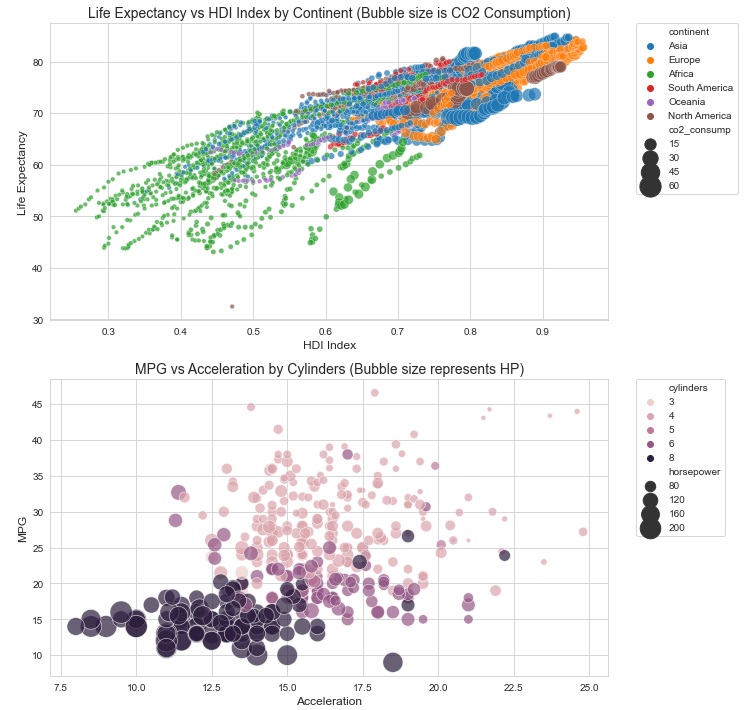
Download the Bubble charts and attach them to your prompt. Source: “Exploratory Data Analysis: Descriptive Analysis, Visualization, and Dashboard Design”, by L. N. de Castro, CRC Press, 2026.
Example:
Analyze the bubble charts attached showing different data for the Gapminder and Auto MPG datasets and write a paragraph explaining what can be observed in each one of them. Reference the images in your response.

6.3 Prompt vs Context Engineering#
Aspect |
Prompt Engineering |
Context Engineering |
|---|---|---|
Focus |
Wording of instruction |
Full environment around the instruction |
Scope |
Single prompt |
Multi-layered input, documents, workflows |
Goal |
Better single response |
Consistent, domain-specific high-quality outputs |
Analogy |
Writing a recipe |
Designing the entire kitchen and pantry setup |
6.4 Example in Education and Learning#
Download the Sample lesson plans. Download the Task lesson plan.
Prompt Engineering Example: Upload the task lesson plan to your prompt.
Summarize this lesson plan in three bullet points.
Context Engineering Example: Upload both files to your prompt.
System Role: You are an instructional designer specializing in technology-enhanced learning.

Reference Context: The attached file SampleLessonPlans.pdf contains three sample lesson plans from previous AI Literacy workshops.

Task: Evaluate the lesson plan attached on file TaskLessonPlan.pdf. Compare it to the reference cases and summarize in three bullet points.

Output: Provide a structured table with Strengths, Weaknesses, and Improvement Suggestions.
By embedding role, reference materials, task, and output format, the model produces more reliable and actionable results.
6.5 Example in Healthcare#
Download the Anonymized patient case. Download the Reference file
Prompt Engineering Example: Upload the anonymized patient case.
Summarize the patient case attached in three bullet points.
Context Engineering Example: Upload the anonymized patient case and the reference file.
System Role: You are a clinical data analyst supporting a hospital’s quality-improvement team.

Reference Context and Task: Review the anonymized patient summary attached and compare it to current treatment guidelines provided in the reference file.

Output: Present your response in three bullet points organized under: Key Findings, Potential Risks, and Recommended Next Steps.
This demonstrates how adding context transforms a basic summarization task into a guided, responsible, and domain-specific analysis—producing output aligned with medical standards and professional use.
Exercise 1: From Prompt Engineering to Context Engineering#
Part A – Prompt Engineering (Baseline)
Use a simple prompt to complete the task below:
Summarize the following startup idea in three bullet points:

Startup Idea: An AI-powered platform that helps local farmers predict crop diseases using satellite images and weather data.
Part B – Context Engineering (Enhanced)
Expand the same task into a context-engineered input by adding:
System Role
Reference Material
Instruction Layering
Output Shaping
Example:
System Role: You are a venture capital analyst specializing in AgriTech startups.

Reference Context: Farmers face billions in losses annually due to crop diseases. Satellite-based solutions are an emerging trend in precision agriculture.

Task: Summarize the following startup idea. Compare it to typical AgriTech innovations and highlight market potential.

Startup Idea: An AI-powered platform that helps local farmers predict crop diseases using satellite images and weather data.

Output: Provide three bullet points under the headings:
- Value Proposition
- Market Fit
- Investment Potential
Your Task:
Write your own context-engineered version of the baseline prompt.
Compare the two outputs (baseline vs. context-engineered).
Reflect: What improvements did context engineering bring to the AI’s response?
6.6 Personalized Assistants and AI Workspaces: Extending the GenAI Toolkit#
Generative AI tools like ChatGPT, Perplexity and Claude provide powerful general-purpose intelligence, but professionals often need domain-specific capabilities. Two recent innovations — Personalized Assistants and AI Workspaces (Projects) — enable you to move beyond using AI as-is and start building tailored AI solutions.
6.6.1 Personalized Assistants#
What are they?
Personalized assistants, such as Custom GPTs, are personalized versions of general-purpose models (like GPT-4/5) that you configure with specific instructions, knowledge base (data), and potentially integrate with external tools to perform specialized tasks more effectively than a general model. Think of them as your own AI partner that understands your context.
When to use them?
Automating repetitive interactions (e.g., customer support, FAQs, personal tutor/assistant).
Acting as a single-purpose agent — a specialized helper for a narrow domain.
Rapid prototyping of ideas that require direct user interaction.
How to create one:
Define the role: What is your model supposed to do (e.g., answer customer questions, analyze investor reports, explain a certain content)?
Set instructions: Craft clear system messages and prompt templates.
Add knowledge: Upload files, FAQs, or curated datasets to ground the model in your domain.
Integrate tools: Connect APIs, code interpreters, or plugins when needed.
Strengths: Always available, consistent tone/persona, easy to scale to many users.
Limitations: Narrow focus, less suitable for managing complex or evolving datasets.
Sample Applications:
Customer support assistant tailored to your product.
Investor relations bot answering FAQs about your startup.
Market research assistant for competitor and trend analysis.
Internal knowledge base for onboarding new team members.
AI Teaching Assistant that explains topics at multiple difficulty levels.
Lesson Plan Generator aligned with curriculum standards.
Academic Writing Coach that reviews clarity, tone, and citation style.
Student Support GPT that answers course-related FAQs using syllabus materials.
Patient Education Assistant that explains diagnoses and procedures in plain language.
Wellness Companion offering lifestyle guidance based on verified sources.
Exercise 2: Create Your Own Personalized Assistant#
Objective: Apply the concepts of Context Engineering and Personalized Assistants by creating a specialized AI assistant trained on a specific dataset.
Task: Download the contents associated with the AI Literacy Program to create your own personalized assistant. You can use the PDF generated from each module of the Jupyter book and the slide decks for modules 1 to 4.
Your assistant should be able to answer questions, summarize modules, and guide learners about the AI Literacy Program using the uploaded knowledge base.
Steps
Define the Role
Example: “You are an AI Literacy Teaching Assistant (“AI-LTA”) for the AI Academy’s AI Literacy Program.”
Upload the Knowledge Base
Use the dataset created as explained in the task above.
Set Instructions
Describe the assistant’s behavior, tone, and purpose.
1. Guide learners through the modules of the AI Literacy Program, ensuring clear understanding of key concepts, terms, and examples.
2. Provide accurate, vendor-neutral explanations about AI history, branches, learning paradigms, generative AI, prompt and context engineering, foundational models, and applied use cases.
3. Maintain conceptual and pedagogical consistency across all modules and exercises.
4. Translate technical ideas into accessible language using concise text, bullet lists, and relatable analogies.
5. Encourage ethical, critical, and responsible use of AI tools; highlight limitations, bias, and verification needs.
6. Support learners with small, actionable steps such as short exercises, quick-win prompts, or “Apply It / Pitfall / Takeaway” conclusions.
7. Assist instructors in refining or integrating materials (slides, cases, rubrics, or activities) while preserving alignment with the program’s goals.
8. Serve as an intelligent index for the program—able to connect topics, summarize modules, and reference supporting files or examples.
9. When information is uncertain or evolving, acknowledge it and suggest ways to verify using credible, up-to-date sources.
10. Always promote transparency, fairness, and human-centered AI learning.
Add some Conversation Starters
Examples:
Give me a short overview of the eight modules in the AI Literacy Program.
Explain the difference between Artificial Intelligence, Machine Learning, and Deep Learning using simple examples.
Summarize what Generative AI and Large Language Models are, and why they matter today.
Design a quick classroom activity to help learners practice prompt engineering responsibly.
Test Your Assistant
Try prompts like:
Summarize what students learn in Module 4.
Who developed the AI Literacy program?
What is the difference between Modules 5 and 6?
Evaluate Quality
How does the assistant’s role, tone, and knowledge data affect output accuracy?
What improvements would you make to the system message or dataset?
Analyze the difference in responses when allowing the PA to reply by using Web Search and otherwise.
6.6.2 AI Workspaces (Projects)#
What are they?
Projects are collaborative AI workspaces that allow teams to combine LLM interactions, files, data, personalized assistants, and notes into one structured environment.
Instead of isolated chats, a Project acts as a hub of AI-augmented workflows.
When to use them?
Organizing and curating research (e.g. market analysis, scientific works, courses, regulations, competitor benchmarking).
Managing multi-step workflows (e.g. data science pipelines, lean canvas, course design, due diligence, project development, product roadmap).
Supporting team collaboration where everyone contributes and refines knowledge (e.g. work area initiatives, sports team prep, construction management).
Core Components:
Knowledge base (files): Upload business plans, reports, datasets.
Model instructions: Direct the behavior and responses of the model.
Collaboration: Teams can contribute, track, and refine insights in one place.
Strengths: Structured, persistent, collaborative, source-grounded.
Limitations: Less dynamic for real-time interaction with external users; requires careful data curation.
Sample Applications:
Organizing all research for a business idea (e.g. market trends, competitors, regulations).
Running due diligence or compliance reviews.
Coordinating product roadmaps and investor pitch material.
Managing an MVP’s iterative development with AI assistance.
Course companion to store syllabus, readings, and assignments to answer student questions and generate study guides.
Lesson plan designer that uses uploaded standards or rubrics to create structured lessons and activities.
Assessment builder to generate quizzes, rubrics, and feedback forms for instructors.
Research grant assistant that uses previous proposals to draft new ones aligned with specific funding calls.
Exercise 3: Create Your “AI Literacy Program” Project#
Objective: Apply the concepts of Context Engineering and Project Design by creating an AI-supported workspace that serves as your Cognitive Workspace for the AI Literacy Program. This project will help you organize materials, analyze learning flow, track revisions, and prototype curriculum improvements over time.
Task: Build a structured environment—your own “AI Literacy Program Project”—that integrates all program files, module PDFs, and supporting materials. This workspace will act as both a repository and a co-development environment for evolving the curriculum collaboratively.
Steps
Define the Role
Example: “You are the AI Literacy Instructor Environment, designed to support program leadership, content development, and long-term evolution of the AI Literacy curriculum.”
Clarify that its purpose is to help organize, map, and improve the course structure.
Upload the Knowledge Base
Include all current program materials such as module PDFs, slides, case studies, and datasets.
As new files are created, upload updated versions to maintain continuity.
Set Instructions
Establish the model’s role and behavior using a system message such as:
Core Role: You are the AI Literacy Instructor Environment.
Primary Functions:
1. Structure, map, and summarize the content of all modules.
2. Maintain conceptual and pedagogical consistency across modules.
3. Track changes, updates, and future versions.
4. Support the creation of derivative materials (slides, cases, rubrics, etc.).
5. Recommend improvements or integrations between modules.
6. Serve as an intelligent index for the program.
Tone: professional, organized, and forward-looking.
Test Your Project
Try prompts like:
Summarize the connections between Modules 3 and 4.
List the updates needed for the next edition of the curriculum.
Generate a concept map linking key ideas across all modules.
Create a draft update memo summarizing improvements for Module 5.
Evaluate Quality
Does the project help you maintain coherence across modules?
Are the summaries accurate and reflective of the program’s goals?
How effectively does the workspace track changes and suggest improvements?
What adjustments could improve its organization, clarity, or analytical depth?
Collaborate
Invite other instructors, teaching assistants, or curriculum designers to contribute.
Encourage shared editing, annotation, and feedback to refine insights collaboratively.
Why It’s an AI Workspace
Unlike a single chat, this space integrates:
Files: Upload the eight course slide decks and Jupyter Book chapters (like AI History and Generative AI & LLMs).
Custom instructions: Guide the model to act as a Course Assistant—helping summarize lectures, quiz students, and explain historical milestones.
Collaboration: Instructors, fellows, and students can all refine prompts, add materials, and build knowledge together.
Persistence: All conversations, uploads, and generated outputs remain in one place—turning AI dialogue into a reusable asset.
Why It’s Not a Personalized Assistant
Scope: A Project contains multiple assistants, files, and workflows, instead of a single AI persona with fixed behavior.
Purpose: It focuses on collaborative tasks and shared outputs, while a Personalized Assistant is designed for personalized interactions with one user.
Structure: Projects integrate diverse materials and dynamic contexts; PAs operate from a static instruction set.
Ownership: Projects can be co-managed by a team or class; PAs are owned and edited by one creator.
Adaptability: Projects allow real-time exploration and iteration across topics; PAs are pre-configured for consistency.
Together, these differences show that Projects serve as collaborative workspaces.
6.6.3 Personalized Assistants vs. AI Workspaces#
Both personalized assistants (like Custom GPTs or Gems) and AI Workspaces (structured workspaces such as OpenAI Projects, Claude Projects, Grok Projects, or Perplexity Spaces) extend the power of foundational models. They serve different but complementary purposes.
When to Use Each#
Scenario |
Use a Personalized Assistant |
Use an AI Workspace |
|---|---|---|
Customer-facing task (answering FAQs, onboarding new users) |
✅ Yes |
❌ No |
Internal research & knowledge management |
❌ No |
✅ Yes |
Rapid prototyping (chatbot, idea validator) |
✅ Yes |
❌ No |
Team collaboration (shared notes, multi-doc analysis) |
❌ No |
✅ Yes |
Automating repetitive workflows |
✅ Yes |
❌ No |
Organizing documentation (business model canvas, pitch prep, compliance files) |
❌ No |
✅ Yes |
Scaling a specific role (legal assistant, marketing copywriter, technical explainer) |
✅ Yes |
❌ No |
Discussion#
Use Personalized Assistants when your goal is to simulate a role or automate a conversation. They are like agents you can design: a customer service rep, an analyst, or even a coach.
Use AI Workspaces when your goal is to structure knowledge, organize complexity, or collaborate as a team. They are like a digital office space where people and AI work together on shared artifacts.
In practice, more sophisticated applications often combine both:
An AI Workspace to organize market research and design the product.
A Personalized Assistant as the product itself (e.g., a customer-facing assistant powered by that research).
Key Insight: Assistants help you execute tasks, while Workspaces help you organize work. Together, they form the backbone of a GenAI-enabled workflow.
6.6.4 Similar Resources Across Platforms#
The idea of customizing and structuring generative AI is spreading across different ecosystems. Below is a comparative table of how major platforms implement features equivalent to Personalized Assistants and Projects:
Platform / Model |
Equivalent to Personalized Assistants |
Equivalent to AI Workspaces |
Sample Use Cases |
|---|---|---|---|
OpenAI (ChatGPT) |
Custom GPTs |
Projects – organize chats, files, notes in one hub |
MVP prototyping, research collaboration |
Claude.ai (Anthropic) |
Artifacts |
Projects – persistent context with files + notes |
Team-based document analysis, compliance reviews |
No direct equivalent |
Spaces – save, organize, and share research threads |
Market/competitor intelligence, curated knowledge bases |
|
xAI Grok |
No direct equivalent |
Projects – thematic workspaces for structured tasks |
Community engagement, startup branding assistants |
Google Gemini |
Gems |
Via Gemini Notebook |
Research + planning inside Google ecosystem |
Microsoft Copilot |
Copilot Agents |
Copilot Pages is a similar feature |
Enterprise workflows, sales/pitch preparation |
Meta LLaMA |
No direct equivalent |
No direct equivalent |
Not applicable |
6.6.5 Connecting to Our Course#
In Prompt Engineering, we explored generative AI as a tool for creativity and analysis.
With Custom GPTs, you learn how to design your own AI-powered assistants.
With AI Workspaces and their equivalents, you experience how AI can become a shared workspace, helping you manage complexity while building your solution.
Both features let you test assumptions, gather feedback, and iterate quickly with minimal cost.
Exercise 4: Personalized Assistants and AI Workspaces#
Team Exercise:
Create a Personalized Assistant that supports your startup idea (e.g. a customer FAQ bot or investor Q&A assistant), your discipline (e.g. a personalized tutor) or your area within the company (e.g. a support bot).
Set up an AI Workspace (or equivalent) to organize your startup/discipline/area research and documents.
Compare across platforms: What worked best? What were the limitations?
By mastering these extensions of the GenAI toolkit, you will learn not just to use AI, but to engineer AI-powered solutions — a critical step in building innovative solutions.
Reflections#
Responsible use: data privacy, bias, hallucinations, transparency
Examples of misuse and how to avoid them
When not to use AI or when to rely on human judgment
What did you learn about AI tools that surprised you?
Which AI tasks are you most comfortable with?
What task in your work would you most like to streamline with AI?
What did you learn about prompt engineering?
📘 Further Reading#
Context Engineering Guide. https://www.promptingguide.ai/guides/context-engineering-guide
LangChain (2025). The rise of “context engineering”. https://blog.langchain.com/the-rise-of-context-engineering/
Lewis, P. et al. (2020). Retrieval-Augmented Generation for Knowledge-Intensive NLP Tasks (RAG). arXiv:2005.11401 https://arxiv.org/abs/2005.11401
Wei, J. et al. (2022). Chain-of-Thought Prompting Elicits Reasoning in Large Language Models. arXiv:2201.11903 https://arxiv.org/abs/2201.11903
Anthropic (2025). Effective context engineering for AI agents. https://www.anthropic.com/engineering/effective-context-engineering-for-ai-agents
Dendritic Institute (2025). AI Literacy Series – Module 6: Context Engineering. (Slides & video lecture)